Description
What Is a Project Prioritization Tool
A project prioritization tool is a structured method used to compare multiple initiatives based on defined criteria such as impact, complexity, and return on investment. It provides a consistent framework to evaluate projects and support objective decision-making.
Why Project Prioritization Matters for Decision-Making
Organizations often face more opportunities than they can execute. Without a structured prioritization approach, decisions may become fragmented, short-term oriented, or influenced by subjective preferences.
Using a project prioritization tool helps align teams, compare initiatives consistently, and focus resources on the most valuable opportunities.
Project Prioritization Matrix: Impact vs Complexity & ROI
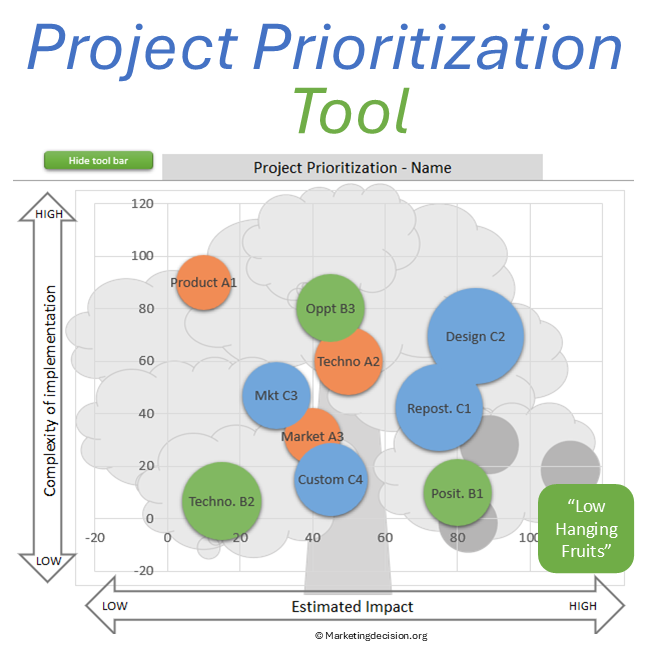
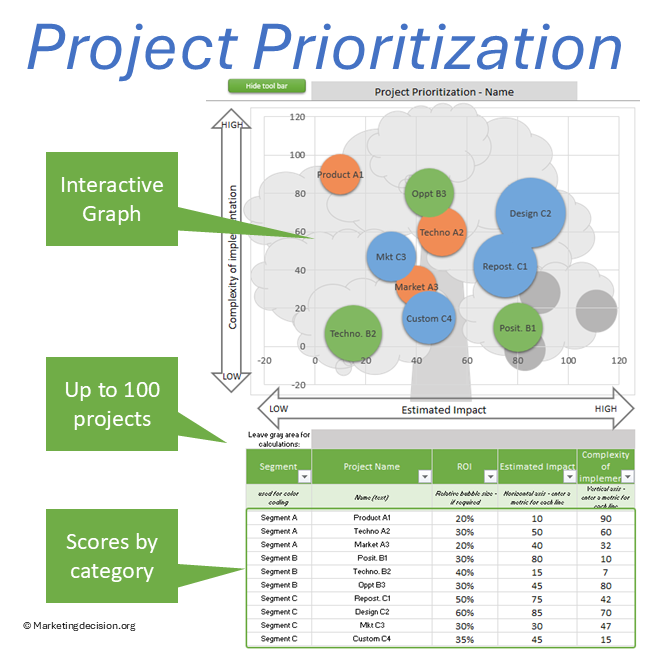
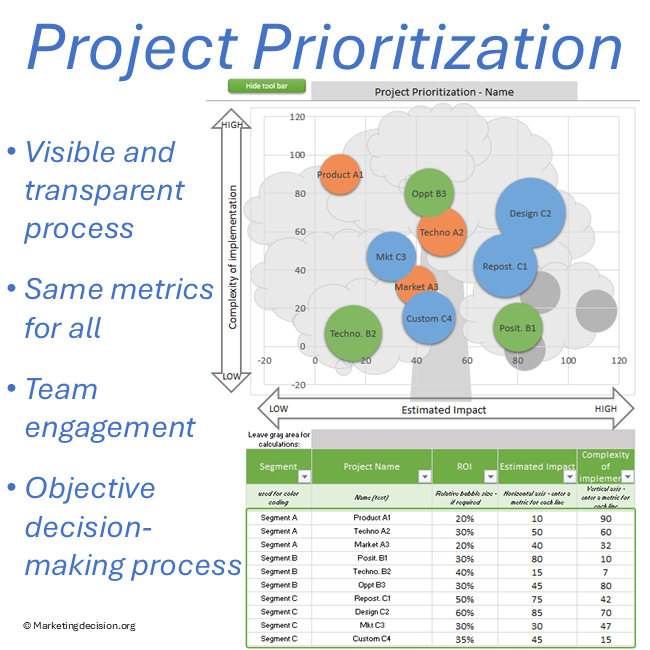
This project prioritization tool is based on a visual matrix:
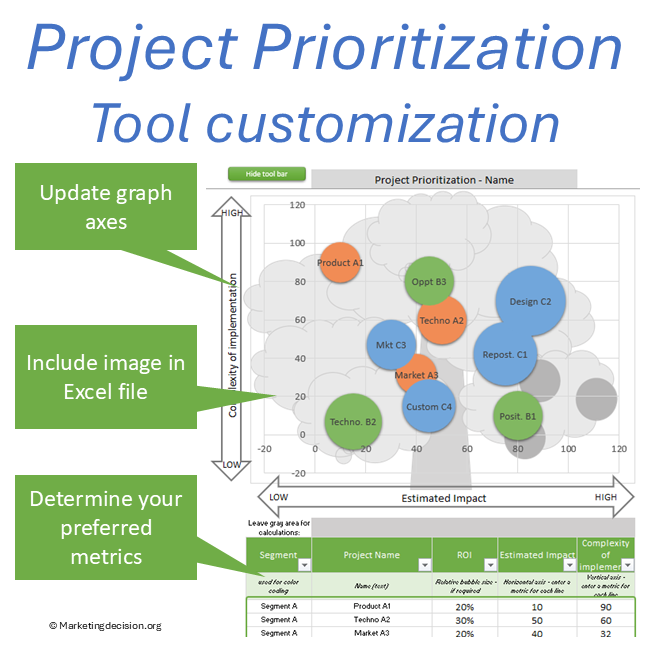
- Horizontal axis: Impact (business value, strategic contribution)
- Vertical axis: Complexity (effort, cost, implementation difficulty)
- Bubble size: ROI (return on investment)
This representation helps identify:
- High-impact, low-complexity projects
- Strategic initiatives requiring more effort
- Lower-priority actions
What This Project Prioritization Tool Does
The Excel tool simplifies comparisons between projects or actions by providing visual capabilities to assess, discuss, and prioritize them.
The number of solutions for comparison can range from 2 up to 100. They can be organized by category (e.g., market segments, initiatives, business units). Excel filters can be utilized to display only selected ones.
Color coding can be adjusted, as well as the size of “bubbles” used to represent each project.
The initial setup allows:
- Horizontal axis to represent impact
- Vertical axis to represent complexity
- Bubble size to represent ROI
The bottom-right quadrant typically represents the most attractive projects.
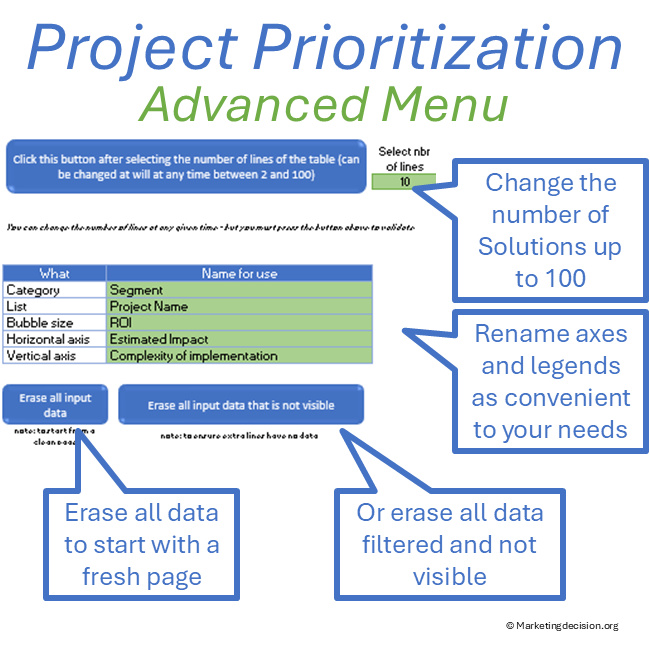
Axes and parameters can be renamed depending on the context.
Key Features of the Project Prioritization Tool
Key features of this project prioritization tool include:
Impact vs Complexity Analysis
- Compare up to 100 projects using structured evaluation criteria
- Visualize priorities using a matrix approach
ROI Evaluation
- Represent ROI through bubble size
- Adjust ROI definitions depending on context
Visual Project Prioritization
- Use customizable bubble charts and color coding
- Support discussions across teams
How to Use the Project Prioritization Tool
Follow these steps:
- Set up your projects and categorize them (market segments, initiatives, business units)
- Define impact, complexity, and ROI values
- Adjust axes and visualization parameters
- Review the matrix to identify priority initiatives and, if needed, use filters to focus on selected projects
Project Prioritization Use Cases
Project Prioritization Matrix
Use the tool to compare initiatives and structure prioritization discussions.
Investment Prioritization
Evaluate investments based on impact, complexity, and ROI to support resource allocation.
Strategic Planning
Align projects with business objectives and long-term priorities.
Advanced Features and Technical Capabilities
Data Selection
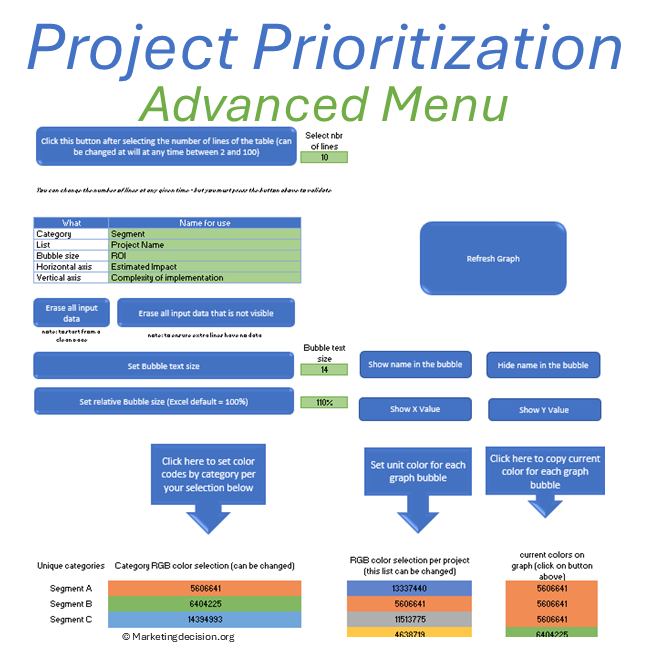
Select the green button “Show Toolbar” to display the advanced features on the left in the toolbar (click again to hide it):
- Select the number of lines for the table between 2 and 100
- Erase all input data
- Erase all input data that is not visible (this can take a few tens of seconds)
- Update axis names and table legends
Note:
For a visualization where the top-right quadrant is most desirable, invert the vertical axis so that complexity decreases upwards while impact increases to the right. The background tree image should then be removed.
Legends Capabilities
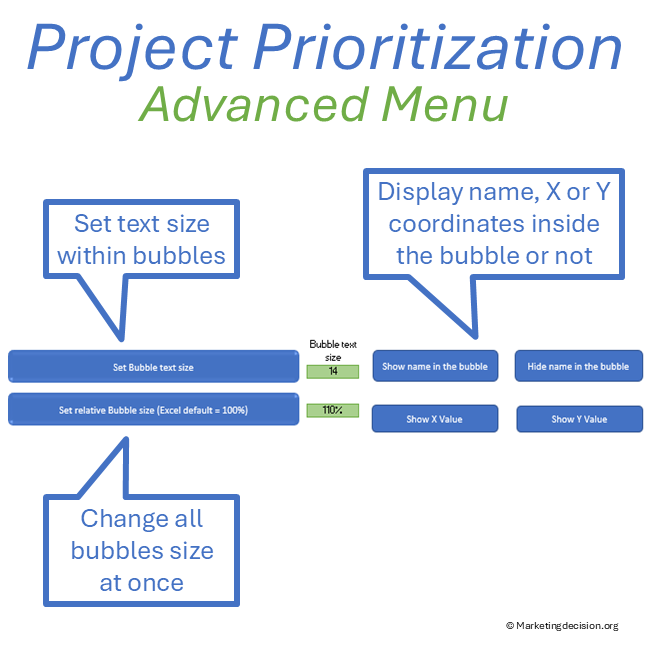
- Show names on the graph bubbles
- Hide names on the graph
- Set bubble text size: click this button once the value is updated
- Set relative bubble size (Excel default = 100%): click this button once updated
- Show horizontal axis value on the graph bubbles
- Show vertical axis value on the graph bubbles
Changing Color Schemes
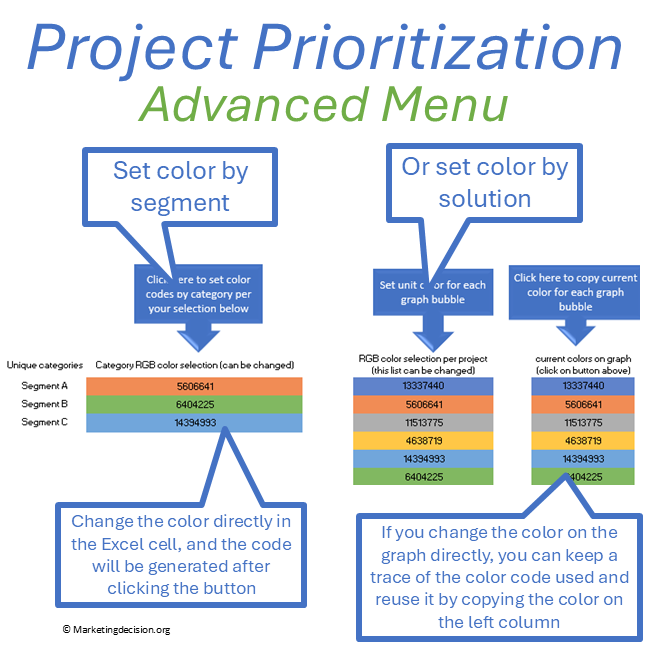
Category-based coloring:
- Modify the color assigned to each category
- Color codes are generated automatically
Project-level coloring:
- Assign a specific color to each project
- Color codes stored in the dataset
Copying color codes:
- Capture colors modified directly in the graph
- Save them into the dataset for reuse
Who Should Use This Tool
This project prioritization tool is designed for:
- Marketing teams managing initiatives and campaigns
- Sales teams evaluating opportunities and resource allocation
- Strategy teams prioritizing investments and projects
- Managers involved in decision-making processes
It is particularly useful in B2B environments where multiple stakeholders contribute to project selection and prioritization.
Project prioritization becomes more meaningful when aligned with solution value, pricing potential, and selling impact. For this overall framework, visit our Solution Mix page.
Campaign prioritization becomes clearer when tied to promotion objectives. Refer to Promotion Strategy for alignment with communication goals.
Prioritization works best when anchored in a clear WHY. See the Decision Mix for the principles behind structured choices.
Usage & Licensing
This product is intended for professional use only. Please review the Sales Conditions to fully understand your rights and usage limitations.
Licensed for a single business unit (up to 100 employees)
Additional licenses required beyond this scope
Download link valid for 2 months
Up to 10 downloads allowed
Users have full access to the application, including embedded macros, and may adapt it to their needs. However, all branding, trademarks, and references must remain visible and unchanged.
Ensure that you have Microsoft Excel and a PC running Windows before purchasing this application. This application uses advanced dynamic range calculations introduced by Microsoft. Please ensure that you are using a compatible version of Excel, such as Microsoft 365, or any version released after Excel 2019 which supports this feature.
We appreciate your feedback on how to improve this application. Feel free to share your suggestions with us at contact@marketingdecision.org