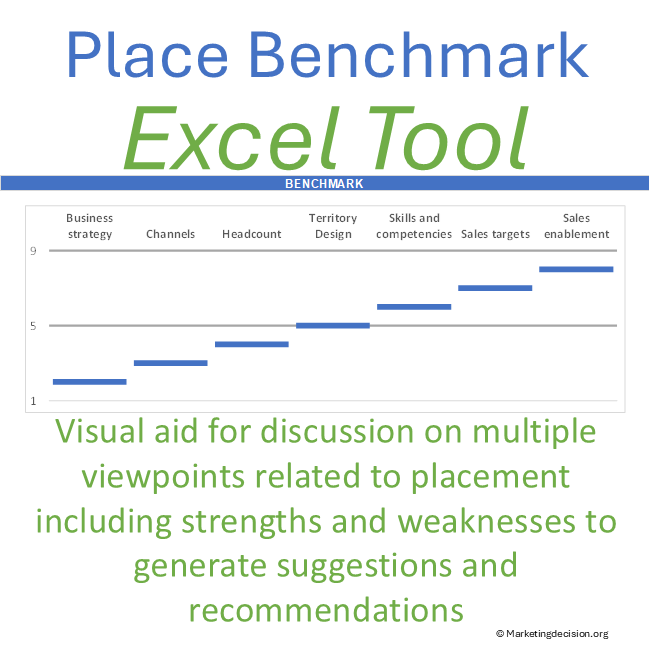
Use this customizable Excel tool to structure the discussion around direct, indirect, and hybrid sales models, compare different viewpoints, and make the assumptions behind the decision visible.
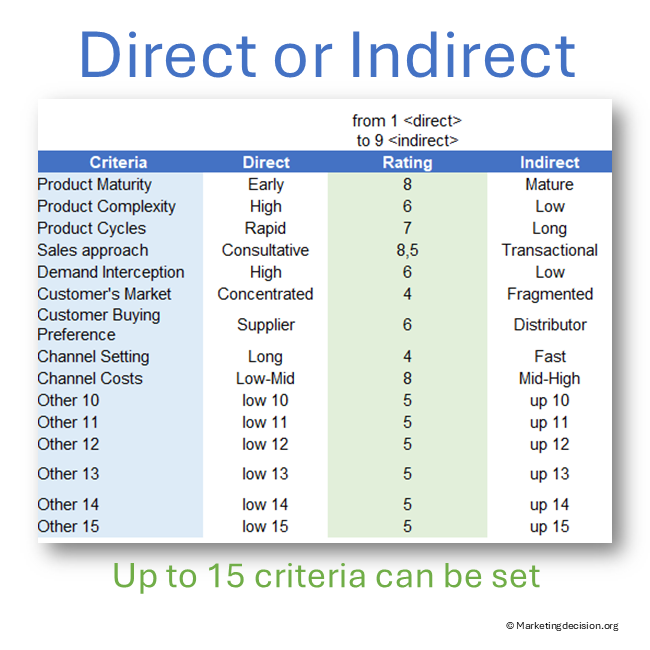
Start with nine predefined criteria or adapt the framework with up to 15 qualitative or quantitative factors relevant to a product, customer segment, market, or region.
The tool does not make the channel decision for you. It helps the people involved understand where their assessments converge, where they differ, and why.
Designed for professional use, the application is provided as an Excel file in English.
© marketingdecision.org
€15.00 Exc. VAT
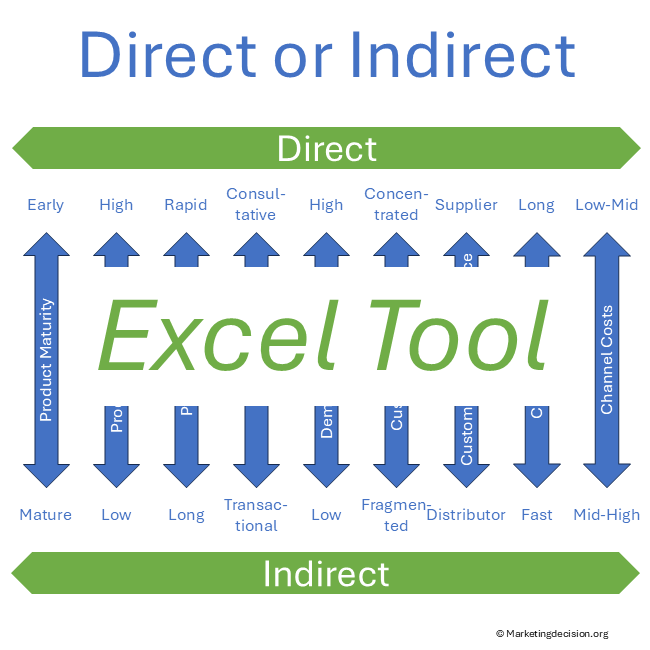
When defining a go-to-market strategy, companies may need to choose between direct and indirect sales – or determine how the two should work together.
These choices can have long-term consequences for customer relationships, market reach, selling capabilities, costs, and the organization required to support the business.
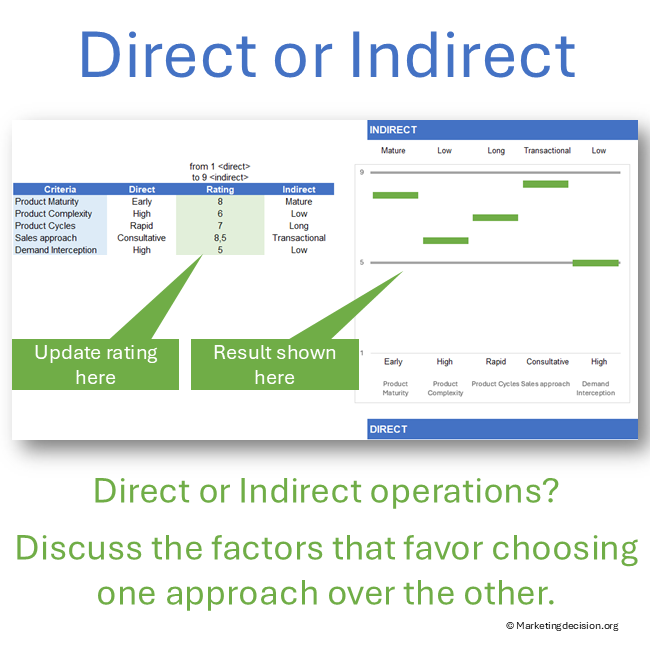
The Direct vs Indirect Sales Tool provides a common framework for making these considerations explicit and discussing them across the organization.
The tool is designed to facilitate a structured discussion among team members. By considering one factor at a time, participants can examine the strengths and weaknesses of different channel approaches and understand how each one relates to the business situation.
Bringing together different business and technical perspectives helps make assumptions and differences in assessment visible. The tool creates an environment where people can bring their different skills, knowledge, and experience into the discussion, helping the team identify opportunities, barriers, and implications that might otherwise be overlooked. The objective is not necessarily to reach immediate agreement, but to build a stronger understanding of the alternatives and pave the way for better-informed decisions.
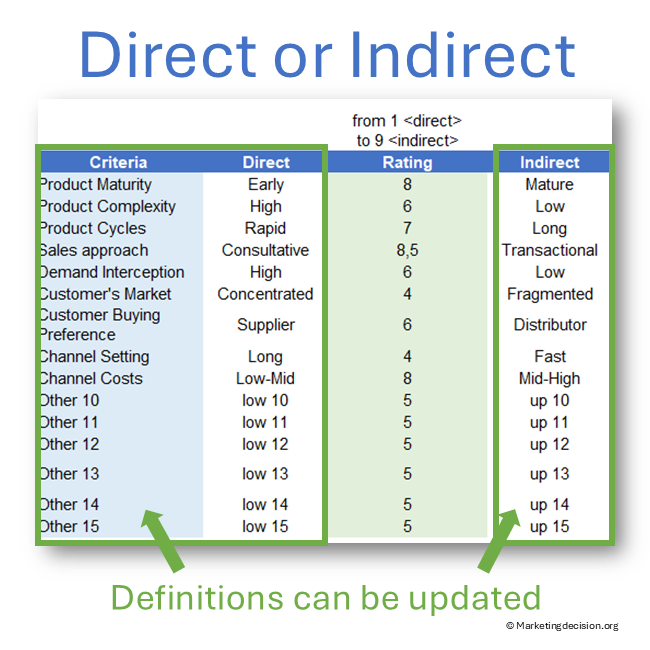
The tool includes nine predefined dimensions that provide a starting point for the assessment:
These criteria provide a starting point for the assessment and can be customized as relevant to your situation.
The framework supports up to 15 criteria, allowing teams to incorporate additional qualitative or quantitative factors such as margin, cost-to-serve, expected volumes, sales economics, partner capabilities, digital readiness, or channel-conflict risk.
The framework should adapt to the decision – not the decision to the framework.
The appropriate channel strategy does not always require an exclusive choice between direct and indirect sales.
Different products, customer segments, markets, or regions may justify different routes to market. Direct and indirect channels can also operate simultaneously as part of a hybrid sales model.
This raises broader questions: Where should direct sales be preferred? Where can partners provide greater reach or capabilities? How should responsibilities be divided? How can channel conflict be managed? And how should the model evolve as products, customers, and markets change?
Explore these questions in our Channel Strategy methodology
Channel decisions often involve different expertise and perspectives.
Sales, Marketing, Finance, Product, Technical, Regional, and Channel teams may assess the same situation differently. The tool provides a common framework for making these viewpoints visible and discussing the reasons behind them.
Differences in assessment can reveal different assumptions, customer experiences, missing information, or conflicting priorities.
Agreement is not required for the exercise to be valuable. Understanding why assessments differ can improve the quality of the eventual decision.
A structured discussion can help turn individual expertise into shared understanding. For complex channel decisions, this may require several discussions rather than a single meeting. Participants may initially discover very different perspectives, assumptions, and priorities. Allowing time to understand these differences, investigate questions, and reconsider assessments can be an important part of the process.
The following provides a possible flow for a structured team discussion. Adapt it to the situation and, where useful, consider involving a facilitator to help structure and support the discussion.
The objective is not necessarily to force an immediate answer. The discussion can first establish a stronger shared understanding of the alternatives and the factors influencing the decision. Participants should have time to listen, question assumptions constructively, investigate uncertainties, and refine their assessments as the discussion progresses.
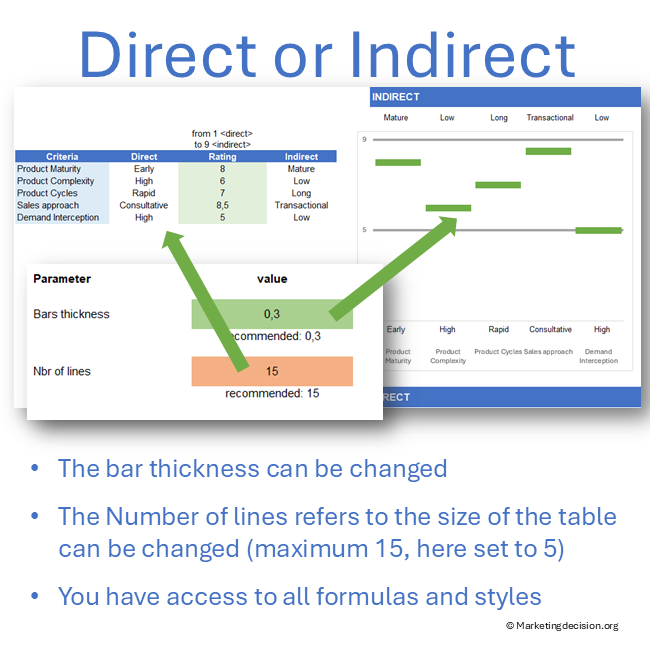
The Direct vs Indirect Sales Tool provides the flexibility to adapt the assessment to the specific decision being considered:
Criteria and parameters are changed on the same worksheet where the results are displayed, allowing participants to see the impact of changes immediately during an individual assessment or team discussion.
The tool does not use macros. It uses dynamic ranges and modern Excel formulas. Microsoft 365 or a current version of Microsoft Excel is recommended. Older Excel versions, including Excel 2019, may not support all required functionality correctly.
See how the tool structures the assessment, displays the results, and supports a direct vs indirect sales discussion.
The Direct vs Indirect Sales Tool helps teams structure channel discussions, compare different viewpoints, and make the assumptions behind direct, indirect, and hybrid sales decisions visible.
Use the framework for a product, customer segment, market, region, or scenario. Adapt the criteria to the decision, identify where assessments converge or differ, and use the discussion to build a stronger foundation for your channel strategy.
The assessment can also help identify the questions and barriers that require further investigation before implementation. Different participants can bring complementary skills, knowledge, and experience to the assessment, helping the team understand the decision from different perspectives and uncover issues that might otherwise be overlooked.
When a new channel approach appears promising, evaluate its expected costs, margins, resources, capabilities, and operational implications. Identify the obstacles that need to be addressed, test important assumptions where possible, learn from the results, and reassess the channel model as the business and market evolve.
For a broader examination of direct, indirect, and hybrid channel strategy – including channel design, conflict, transition, and evolution – see our Channel Strategy methodology.
Purchase and use of the application are subject to the applicable General Sales Conditions.
General Sales Conditions — English
Conditions Générales de Vente — Français
We use cookies to improve your experience on our site. By using our site, you consent to cookies.
Manage your cookie preferences below:
Essential cookies enable basic functions and are necessary for the proper function of the website.
These cookies are needed for adding comments on this website.
Stripe is a payment processing platform that enables businesses to accept online payments securely and efficiently.
Service URL: stripe.com (opens in a new window)
Statistics cookies collect information anonymously. This information helps us understand how visitors use our website.
Google Analytics is a powerful tool that tracks and analyzes website traffic for informed marketing decisions.
Service URL: policies.google.com (opens in a new window)